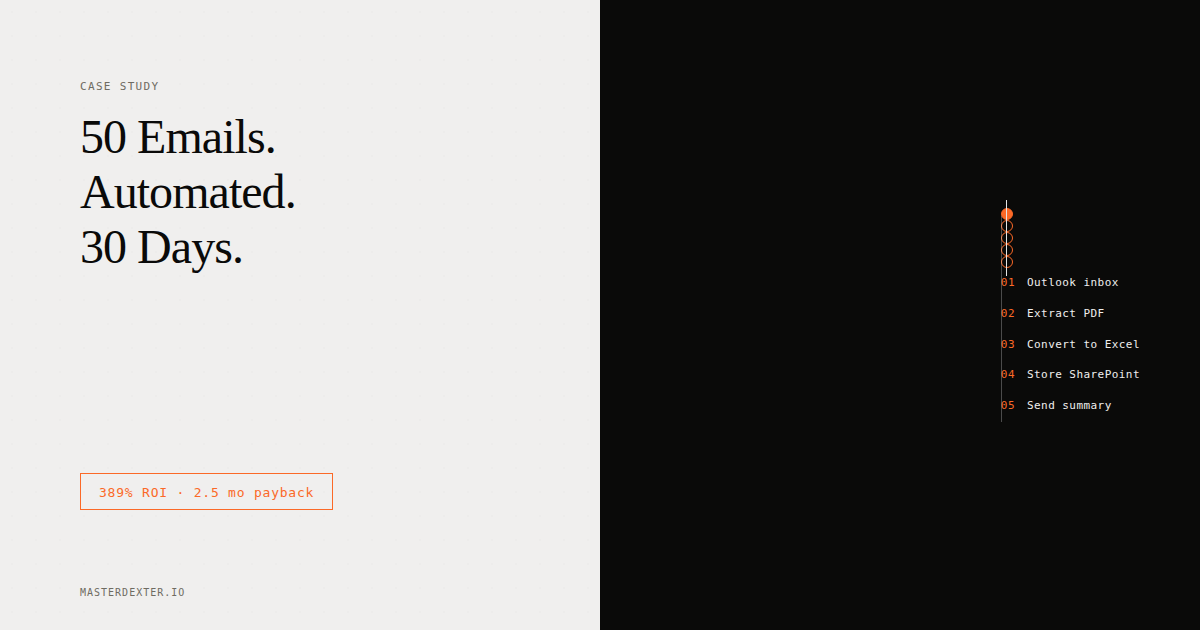
Every day, someone on Hector Beverages' sales team opened their Outlook inbox, found roughly 50 emails from vendors and distributors, extracted the PDF attachments, converted each one to Excel, and filed everything in SharePoint.
By hand. Every single day.
Hector Beverages makes Paper Boat drinks. You have probably had one. The brand is built on nostalgia and authenticity. Their internal sales operations, in November 2025, were still running on manual PDF extraction.
We built the automation that took that number from 50 to zero. Here is the exact story: what we built, what broke, why we made every tool decision we made, and the ROI math that justified the project before a single line of code was written.
The ROI calculation you should run before any automation project
Before a leader approves an automation project, they need a number they can defend to a CFO. Not "productivity gains." An actual calculation.
Here is the formula we used:
Annual Time Saved (hours) =
  Daily tasks automated
  x Minutes per task
  x Working days per year
  / 60

Annual Cost Saved =
  Annual time saved
  x Average hourly cost of the person doing it

Total Automation Cost =
  Build cost
  + (Monthly infra cost x 12)
  + Annual maintenance hours x developer rate

ROI % =
  (Annual Cost Saved - Total Automation Cost)
  / Total Automation Cost
  x 100
Applied to the Hector scenario:
50 emails/day x 5 minutes/email x 250 working days = 62,500 minutes/year
62,500 / 60 = 1,042 hours/year
1,042 hours x $10/hour = $10,420 annual cost saved

Build cost (10 to 15 hours at $50/hr): $750
AWS EC2 monthly ($15 x 12): $180
n8n self-hosted: $0 (vs $50/month on cloud)
Maintenance (2 hours/month x 12 x $50): $1,200
Total automation cost: $2,130

ROI = ($10,420 - $2,130) / $2,130 x 100 = 389% in year one
Payback period: 2.5 months
The project paid for itself in under three months. Every month after that is pure return.
Most ROI calculations only count obvious time saved. They miss error correction cost (manual data entry from PDFs has error rates of 1% to 5%, and one wrong number in an order quantity can cascade into chargebacks and reconciliation work), cognitive load cost (people doing repetitive data work burn out faster and make more errors toward the end of a shift), and opportunity cost (a person spending 4 hours a day on PDF extraction is not doing account management or analysis).
Why we chose n8n and not LangChain or CrewAI
This is the question every technical person asks first. So let me answer it directly.
The Hector team had 5 to 10 people who would need to own and operate this system after handover. They were not developers. Some had exposure to Power Automate through Microsoft's stack, but debugging a Python traceback was never on the table.
When you are building for a non-technical team, the tooling decision is not a technical decision. It is a people decision.
LangChain is a powerful framework. But it assumes you know Python, you understand how agents reason, you can read stack traces, and you are comfortable managing environment dependencies. If something breaks on a Friday evening, a sales operations manager cannot fix it. They will wait for a developer.
CrewAI has the same problem. Excellent for orchestrating multi-agent systems, but the mental model of "agents with roles collaborating toward a goal" is abstraction-heavy. The value it brings is in complexity. And complexity was not what this project needed.
n8n gave us a visual workflow canvas where every step is a node, every connection is visible, and every error points to exactly where the problem is. You can see your entire automation on one screen. You can click into a failing node and read what went wrong without opening a terminal.
The 2x2 that makes this decision simple:
| Non-Technical Operators | Technical Operators | |
|---|---|---|
| High Problem Complexity | Danger Zone (needs abstraction layer first) | LangChain / CrewAI / Custom Code |
| Low Problem Complexity | n8n / Make / Zapier | n8n anyway (save time) |
Hector sat in the bottom-left quadrant: low-to-medium problem complexity, non-technical operators. n8n was the right call.
The problem itself was deterministic: get email, find PDF, convert, store, notify. That is a pipeline, not an agent. n8n was designed for exactly this.
What we actually built
The final pipeline:
Outlook (monitored mailbox)
    |
    | [Webhook trigger on new email]
    v
n8n Workflow on EC2 (Ubuntu 22.04 / t3.micro)
    |
    |-- Filter node: Check for PDF attachment
    |
    |-- If PDF found:
    |       |-- Extract attachment binary
    |       |-- Send to PDF conversion service (external API)
    |       |-- Parse returned Excel data
    |       |-- Write to SharePoint folder (via Microsoft Graph API)
    |       |-- Compose summary email
    |       |-- Send via Outlook SMTP node
    |
    |-- If no PDF:
            |-- Log and skip
No LLM anywhere in this pipeline. The PDF-to-Excel conversion used a structured parsing approach, not generative AI. The intelligence is in the routing logic, not the model.
What broke (and what we learned)
The EC2 instance was running but unreachable
Browser pointed at the IP, returning ERR_CONNECTION_TIMED_OUT after 33 seconds. The n8n instance was running. The EC2 instance was up. But the connection timed out before reaching the application.
Root causes were layered: security group rules set correctly in theory but not applied properly, UFW on Ubuntu blocking port 5678 even though AWS was allowing it, and a reverse proxy configuration that was partially done but not finalized.
Lesson: Set up the Elastic IP before writing a single workflow. The dynamic IP situation cost us multiple hours and should have been resolved on day one.
Credential management in managed Microsoft environments
n8n integrates with Outlook and SharePoint via Microsoft OAuth. For companies running managed Microsoft environments, IT policy often blocks third-party OAuth registrations by default.
Hector was operating within these restrictions. There were also moments where credentials were changed mid-session for testing, causing authenticated nodes to break without obvious error messages. The workflow would fail silently at the Outlook connection step, and tracing it back to a recently rotated credential required manual inspection of each node.
Lesson: Build credential rotation procedures into the handover documentation from day one. In enterprise environments, credential management is not a one-time setup task.
PDF quality is not uniform
Not all PDFs are created equal. A vendor sending a structured table is very different from one sending a scanned image. OCR on scanned documents has meaningful error rates, and when you are processing financial data, those errors matter.
We set up the pipeline to flag exceptions rather than process silently, so the team would know when a document needed manual review. The first iteration processed everything and only surfaced errors when someone noticed the output was wrong.
Lesson: Build exception handling early, not as an afterthought.
The dual delivery model
One aspect of this project that made it different from a standard implementation was that we were doing two things simultaneously: building the automation and training the team to understand it.
The training actually happened. And running build and training in parallel created an interesting dynamic. The team learned by watching the system get built, then built their own version alongside ours. By the end, both versions existed - ours as the production reference, theirs as the learning artifact.
The best way to train non-technical people on automation tools is not a lecture. It is supervised parallel construction. They build what you build, they make the same mistakes you make, and they learn what breaks and why. When the system needs debugging in production, they have muscle memory, not just documentation.
What the team got at the end
At the end of the project, a 5 to 10 person operations team that had never built an automated workflow could:
- Open their n8n canvas and read a running workflow
- Identify a failing node and understand the error message
- Re-authenticate a broken Outlook or SharePoint connection
- Build a simple new workflow from scratch using existing nodes as reference
The 50-emails-a-day manual processing problem went to zero. Every incoming PDF is now processed, converted, stored, and summarized automatically. The team's time moved from data entry to exception review.
The difference between "we have an automation" and "we can automate" is the difference between a service dependency and an internal skill. That is what changed.
Want to build systems like this for your team?
This is exactly the kind of work Dextar does for enterprise clients and startups: production-grade AI and automation systems, delivered with internal capability transfer. If you are looking at a similar problem, let us talk.
What I build and how I can help
- MasterDexter live cohorts
- MasterDexter Teams - private cohorts to train your AI team on production systems
- AITalentStudio - vetted, production-ready AI talent for your company
- Dextar - AI engineering development and consulting for enterprises and startups
- Buildership - ideas to ship real AI